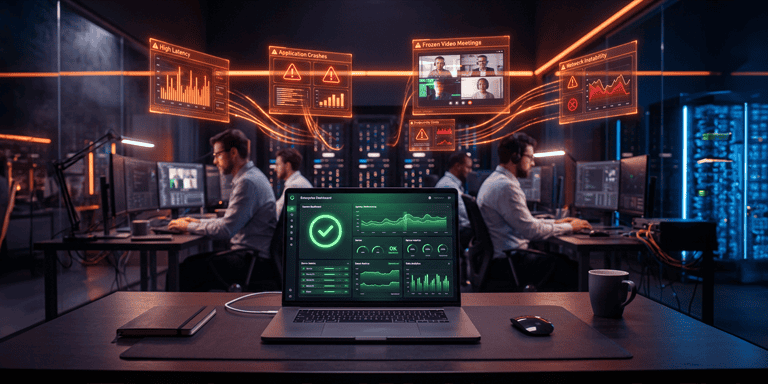
The IT team opens the dashboard and everything is seemingly under control. Servers are available, links are active, applications are responding, CPU usage is as expected, ticket volumes show no unusual spikes… Even so, operations complain. This gap between what the infrastructure shows and what the employee experiences is the core of the digital employee experience, the concept we will explore in this article.
The system takes too long to load, the video conference freezes, the laptop takes minutes to become usable, the VPN drops in the middle of a critical task—the employee wastes time trying to figure out if the problem is the network, the application, the device, or their access.
To the infrastructure, the environment might look stable. To those who need to work, it might be slow, unstable, and frustrating.
This difference in perception is one of modern IT’s biggest gaps. Not every problem appears as a critical incident, not every failure generates an alert, and not every operational impact translates into downtime. Sometimes, the company doesn’t have an offline system. It has hundreds of minor digital frictions happening daily, affecting productivity, customer service, collaboration, and work quality.
What Is DEX and Why Does It Matter to IT?
DEX stands for Digital Employee Experience.
In practice, the concept looks at how people interact with the digital resources they use for work: devices, applications, networks, corporate systems, collaboration tools, access, authentication, support, and performance.
The main point is simple: it is not enough to know if the infrastructure is “up.” IT also needs to understand if the technology is working well for those who rely on it daily.
This significantly changes how we observe the environment.
- A server might be available, but the application might load slowly for certain users.
- The network might be active, but a branch might face instability at specific times.
- The laptop might be “working,” but with slow boot times, frequent crashes, and poor performance.
- A ticket might not have been opened, but the employee might be finding a workaround on their own.
DEX helps bridge the technical view and the actual user experience. Instead of solely tracking uptime, resource consumption, and infrastructure alerts, IT begins to monitor signs that indicate how technology impacts the employee’s routine.
The Advantage of Looking at Employee Experience
This perspective is crucial because many digital issues don’t start as major incidents. They manifest as wasted time, rework, sluggishness, decreased productivity, and a silent rise in internal dissatisfaction.
For IT, this represents a shift in mindset: moving from a predominantly reactive, ticket-dependent model to a more proactive approach driven by experience data.
Why Doesn’t Traditional Monitoring Show the Full Employee Experience?
Traditional monitoring was built to answer essential infrastructure questions:
- Is the server available?
- Is the application online?
- Is the link active?
- Is there abnormal CPU, memory, or disk consumption?
- Are there any critical alerts open?
These questions remain important. Without them, IT loses control of its operational baseline. The problem is that they don’t tell the whole story.
Between an “active” status and a “good” experience, there is a vast distance. A system can be available and still be too slow to support the sales team’s routine. A collaboration tool might work but present recurring glitches for remote workers. A device might be connected to the network but perform poorly enough to delay simple tasks.
Therefore, it is necessary to understand what happens from the moment a person turns on their equipment until the completion of a task: login, authentication, opening applications, system responsiveness, connection stability, file access, use of communication tools, and support when something fails.
When this journey is broken, operations feel it. But IT doesn’t always see it.
Another important point is that many employees stop opening tickets for recurring issues. They restart their computer, switch networks, postpone a task, ask a colleague for help, or simply put up with the sluggishness.
In performance reports, nothing happened. For operations, time was lost. This is why digital experience must be monitored as part of IT management, not just as a subjective user perception.
Digital Employee Experience: Signs the Infrastructure Doesn’t Show
Certain signs usually indicate that the digital experience is affecting operations, even when traditional metrics appear normal.
One of them is the increase in informal complaints. IT doesn’t see a spike in tickets but starts hearing phrases like “my system is always freezing,” “the meeting dropped again,” or “every day I waste time trying to log in.”
Another sign is delays in simple tasks. When opening an application, authenticating access, or loading a screen becomes a significant part of the routine, technology stops supporting the work and starts draining the team’s energy.
It is also worth noting the recurrence of problems by profile, department, or location. A branch office might face constant slowness, remote users might struggle more with certain systems, or a critical application might perform worse during peak hours.
There are also the less visible impacts: drops in productivity, increased rework, loss of focus, delays in customer service, lower adoption of corporate tools, and a negative perception of IT.
The goal is not to turn every complaint into a critical incident. The goal is to create visibility to prioritize better.
When IT understands where the digital experience is stalling, it can separate noise from structural problems. It can identify patterns. It can act before dissatisfaction turns into a high volume of tickets, operational downtime, or pressure from business units.
This understanding also improves communication with leadership. Instead of just presenting technical metrics, IT can show impact: which groups are affected, which tools generate the most friction, which problems consume the most time, and where preventive action can yield real operational gains.
DEX Does Not Replace Monitoring. It Broadens IT’s Vision.
A common mistake is treating DEX as a replacement for traditional monitoring. That is not its role. The company still needs to track availability, infrastructure performance, security, networks, applications, and capacity. This data remains fundamental for managing the environment.
What changes is the interpretation layer. DEX adds a question that often remains outside technical dashboards: how does all this reach the employee? This question seems simple, but it shifts IT’s prioritization.
An infrastructure alert might be technically relevant but have a low impact on operations at that moment. On the other hand, sluggishness distributed among dozens of users might not trigger a critical alarm but can compromise productivity for hours.
Without visibility into the experience, IT risks prioritizing only what the technical environment shows, and not necessarily what affects the business most.
With a digital experience-driven approach, the department can cross-reference signals from devices, applications, networks, access points, and user behavior to form a more accurate picture of operational reality.
This helps answer questions such as:
- Which applications cause the most friction for users?
- Which groups are experiencing the most slowness?
- Which problems recur without turning into tickets?
- Which devices are hindering the team’s routine?
- Where can IT intervene before operations come to a halt?
These answers make IT more strategic because they connect technology, productivity, and the work experience.
How IT Can Start Looking at Digital Experience
The first step is not necessarily adopting a new tool.
Before that, IT needs to recognize that current metrics might be incomplete. From there, it’s worth mapping out which digital journeys are most critical to operations.
In a customer service company, for example, the priority might be the systems used by the support team. In a commercial operation, it could be the CRM, video conferencing tools, and remote access. In an administrative department, it might be internal systems, shared files, and productivity applications.
Next, IT can observe where the highest volume of friction occurs: recurring slowness, access failures, slow equipment boot times, instability in meetings, poor application performance, or an increase in informal complaints.
It is also important to bridge technical data and user perception. Digital experience doesn’t rely solely on telemetry. It also involves understanding how people feel the impact of technology on their work.
When these data points start to connect, IT gains a more comprehensive view to act with priority, context, and predictability.
Frequently Asked Questions About Digital Employee Experience (DEX)
- What is Digital Employee Experience (DEX)? DEX is the practice of measuring and improving how employees experience technology on a daily basis (devices, applications, networks, and support), going beyond the technical availability tracked by traditional monitoring.
- What is the difference between IT monitoring and DEX? Traditional monitoring measures if the infrastructure is available: servers, networks, and applications online. DEX measures how this infrastructure reaches the employee: whether it is fast, stable, and easy to use in their daily routine.
- How can IT start measuring the digital employee experience? The first step is to map the operation’s most critical digital journeys and observe where there is the most friction (recurring slowness, access failures, meeting instability) by cross-referencing technical data with the real perception of those who use the technology every day.
IT Needs to Look Beyond Availability
The digital employee experience has become an important layer for understanding how technology truly impacts work. It helps reveal problems that don’t appear on traditional dashboards but directly affect team routines.
Altasnet acts as a partner to broaden visibility into the digital employee experience, support more accurate diagnostics, and help companies connect infrastructure, operations, and productivity.
In projects that require deeper technical visibility, Altasnet can also support the adoption of specialized DEX solutions, always aligned with the context, maturity, and needs of each environment.
Want to understand where the digital experience is stalling your operations? Talk to Altasnet.