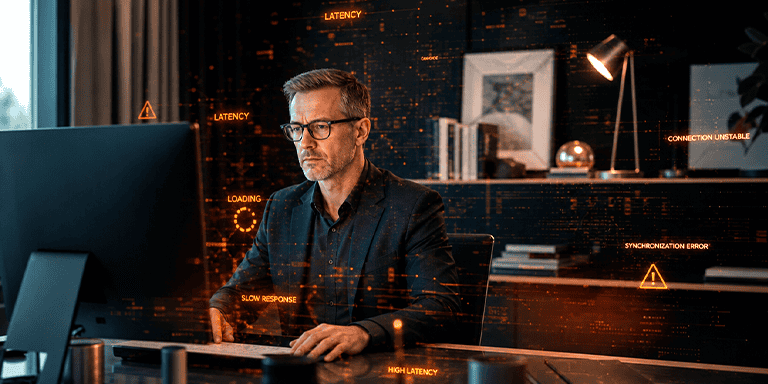
The remote employee did not open a ticket. Instead, they took longer to respond, joined a meeting late, turned off their camera because of connection issues, or struggled to access systems and complete tasks on time.
This is one of the major challenges of hybrid work: many digital issues occur outside the traditional workplace and never reach IT as formal support requests. Employees try to work around them by restarting their laptops, switching networks, using another device, asking a colleague for help, or simply adjusting how they work to cope with a poor digital experience.
The company keeps running, but with more interruptions, longer delays, and less predictability.
In distributed environments, IT cannot rely solely on open tickets to determine whether employees can work effectively. It needs greater visibility across endpoints, applications, access methods, networks, and employees’ day-to-day digital experience.
How to Monitor the Digital Experience of Remote Employees
Monitoring the digital experience of remote employees means understanding how technology performs under the real-world working conditions of employees outside the office.
This involves looking at the employee’s end-to-end digital experience: device boot time, connection stability, corporate application performance, remote access quality, authentication failures, system freezes, and the ability to complete tasks without constant interruptions.
It is not just about knowing whether an application is available. The broader question is: can employees use technology smoothly and reliably enough to remain productive, collaborate effectively, and maintain the quality of their work?
Beyond technical metrics, digital experience can also be evaluated through employees’ own perceptions. Some approaches combine direct user feedback with usage and performance data collected across large numbers of devices and applications. This allows IT to compare individual experiences against broader performance baselines and identify situations that require attention.
This perspective is especially important because remote work introduces an additional layer of variables. Employees may be using unstable home internet connections, relying on corporate access mechanisms such as VPNs, accessing critical systems remotely, moving between collaboration tools, and working from endpoints that IT may have less visibility into than devices operating within the corporate environment.
Certain signs can help IT monitor this experience with greater context:
- Long device boot times
- Recurring performance degradation in corporate applications
- Login or authentication failures
- Instability in VPN connections or other remote access methods
- Degraded audio and video quality during online meetings
- Intermittent freezes when using corporate applications
- An increase in informal complaints about digital tools
- Low adoption of key systems due to usability issues
- Delays in completing technology-dependent tasks
- Direct user feedback
- Benchmarking individual experiences against broader performance baselines
These signals do not replace traditional infrastructure metrics. Instead, they broaden IT’s perspective. Rather than simply determining whether the environment is “up,” IT gains visibility into how technology is actually performing from the employee’s perspective.
Why Does IT Lose Visibility in Hybrid Work?
IT loses visibility in hybrid work because a significant part of the operation now takes place outside the corporate network, beyond the controlled physical environment, and involves variables that do not always appear on traditional dashboards.
In the office, IT generally has greater control over networks, endpoints, access policies, on-site support, and local infrastructure.
In a remote or hybrid model, the user experience depends on a broader combination of factors: home internet connections, home Wi-Fi, corporate endpoints, VPN connections, cloud applications, authentication mechanisms, collaboration tools, and specific usage conditions.
The problem is that, from the employee’s perspective, all of these elements form a single experience. If a meeting freezes, a system slows down, or access fails, the perception is simple: “the technology is not working properly.”
For IT, however, the diagnosis can be far more complex:
- The application might be stable, but remote access may be adding latency.
- The device might be operational but underperforming.
- The corporate network might be operating normally while the user’s connection fluctuates.
- The system might pass every technical check yet still load too slowly for remote users.
Without visibility into this distributed digital journey, IT has to rely heavily on user reports—and those reports often arrive late, incomplete, or not at all.
Where Is Visibility Typically Lost?
In hybrid work, visibility can be lost at multiple points across the digital experience:
- Distributed endpoints: Laptops and desktops outside the office may experience performance degradation without IT noticing immediately.
- Unmanaged networks: Home internet connections, home Wi-Fi, and external networks can affect the experience but are not always under the company’s control.
- Hybrid access: VPN connections, multi-factor authentication, security policies, and permission levels can introduce additional steps and potential points of failure.
- Critical applications: Systems used every day may perform differently depending on location, endpoint, and access method.
- Limited troubleshooting context: The help desk receives the complaint but often lacks telemetry from the exact moment the issue occurred.
This lack of visibility creates a practical challenge: IT knows that interruptions exist but cannot always determine whether they originate in the application, the network, the endpoint, remote access, or the way the technology is being used.
Signs of Digital Friction That Never Become Support Tickets
Not every employee opens a ticket when they experience a digital problem. Often, they consider the issue “not worth a ticket,” assume it is temporary, or simply try to fix it themselves so they can keep working.
The result is an operation filled with small, invisible workarounds.
The meeting connection becomes unstable, so the employee turns off their camera. The system slows down, so a task gets postponed. An application freezes, so they ask a colleague to access it instead. The login fails, so they keep trying until it works. The laptop slows down, so they reduce the number of applications they have open and continue working with reduced efficiency.
In isolation, these situations may seem minor. Together, they reduce productivity, increase frustration, and hinder collaboration.
Certain signs should attract IT’s attention:
- Employees avoiding specific tools
- Recurring poor meeting quality affecting the same users
- Delays in tasks that depend on corporate systems
- The use of shadow IT or alternative channels to work around recurring technical issues
- Informal reports of performance problems that never reach the help desk
- Productivity declines in remote teams without a clear operational cause
- Increased rework caused by access, synchronization, or update failures
- Difficulty maintaining standardized processes outside the office
These signals demonstrate that the digital experience can be compromised even without a formal spike in support tickets.
The challenge is that when IT waits for a ticket before taking action, many of these issues have already disrupted the employee’s work. Time has been lost, a delivery has been delayed, a meeting has been disrupted, or a customer has already experienced the impact.
Moving from Reactive IT to Experience-Driven IT
An experience-driven IT department identifies issues before they turn into recurring complaints. It looks beyond availability and focuses on the quality of the employee’s digital experience.
This shift starts with a simple question: what is making people’s work harder, even when the infrastructure seems stable?
From there, IT begins correlating technical telemetry with day-to-day usage patterns and user experience signals.
Instead of treating latency, freezes, or access failures as isolated events, IT looks for patterns across users, teams, locations, applications, endpoints, and access methods.
This approach enables better prioritization:
- An issue affecting a small number of users in a critical department may have a greater business impact than a technical alert with no operational consequences.
- Instability affecting only remote employees may point to a bottleneck that traditional monitoring fails to detect.
- An application that is online but performs poorly in specific use cases may be affecting productivity without ever triggering a downtime alert.
IT Needs to See What Happens Outside the Office
In remote and hybrid work, the absence of a ticket does not mean the absence of a problem. Often, it simply means that the employee has learned to work around a poor digital experience.
IT needs visibility into what happens beyond the controlled office environment: remote employees, hybrid access methods, distributed endpoints, and critical applications used every day.
With greater visibility, it becomes easier to understand where the digital experience is breaking down, which departments are affected, and which issues should be prioritized before they affect productivity, collaboration, and business outcomes.
Altasnet helps organizations gain broader visibility and build a more proactive IT operation capable of understanding the employee’s digital experience across distributed environments.
For projects that require a more advanced technical layer, solutions such as Riverbed Aternity can provide deeper visibility into experience signals across endpoints, applications, and user journeys, strengthening IT diagnostics and decision-making.
Want greater visibility into the digital experience of your remote workforce? Talk to Altasnet to understand how data from endpoints, applications, and user journeys can help your IT team identify issues earlier and act more proactively.